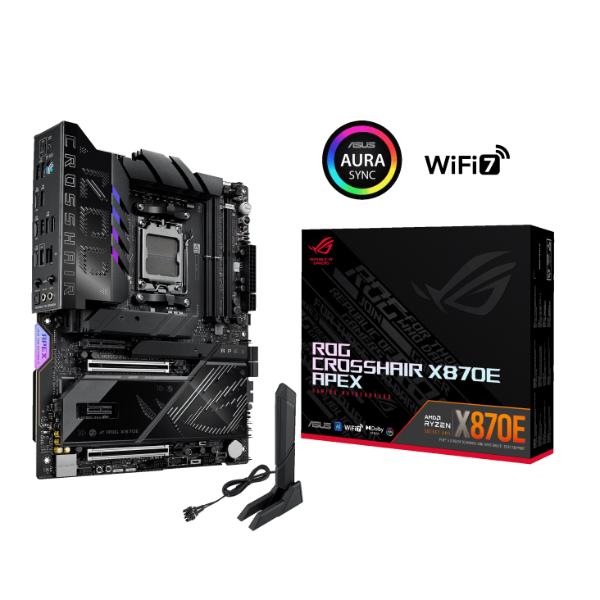
Asus ROG Crosshair X870E Apex Motherboard
Brand: Asus
SKU: ROG-CROSSHAIR-X870E-APEX
Price: ₹67,999 (inclusive of GST · genuine product with warranty)
Specifications
| Socket | AM5 |
|---|---|
| Chipset | AMD X870E |
| Motherboard Size | ATX |
| Motherboard Series | Asus ROG |
About this product
Asus ROG Crosshair X870E Apex Motherboard
The AI PC-ready Asus ROG Crosshair X870E Apex is built for world-record overclocking, courtesy of extensive BIOS features and the exotic cooling of the ROG-exclusive Memory Fan Kit. Beyond its overclocking prowess, it delivers comprehensive support for cutting-edge graphics cards and storage, making it the ultimate platform for AM5 AMD Ryzen™ performance enthusiasts.
Asus ROG Crosshair X870E AI Equipped
Leveraging Artificial Intelligence, the Asus ROG Crosshair X870E Apex can boost performance with automatic AI overclocking and cooling, enhancing your games and productivity without compromising thermal capabilities. You can ask the ASUS AI Adviser questions about optimizing your system's performance and finding out more about its features.
Easy Overclocking
The ROG Overclocker's Toolkit includes hardware-level controls that can enhance your overclocking experience. They include Safe Boot, BCLK, and Retry buttons, along with RSVD, LN2 Mode, Slow Mode, and BIOS switches. There are also Probeit measurement points for advanced tuning. A differential-sensing circuit and delicate IC simplify overclocking and tuning by allowing you to accurately track voltages. Specialized circuitry detects when condensation occurs on the back of the board.
AEMP III
ASUS Enhanced Memory Profile III (AEMP III) is an advanced firmware feature that empowers users to achieve unparalleled memory performance with cutting-edge CUDIMM memory.
Enhanced Power Solution
Equipped with 18(110A)+2(110A)+2(80A) power stages with ProCool II connectors, MicroFine alloy chokes, and durable capacitors, this motherboard delivers stable power throughout the entire motherboard, maintaining electrical volume whether you are performing simple tasks or operating at full power during resource-demanding processes.
ROG Memory Fan Kit
The included cooling solution can unleash memory overclocking for up to 9600 MT/s.
Comprehensive Cooling
A VRM heat sink works with highly conductive thermal pads and a chipset heat sink to efficiently dissipate heat. M.2 heat sinks and dedicated backplates help to ensure optimal SSD performance during sustained workloads. The DIMM.2 card also includes a hefty heat sink.
Gaming Audio
Asus ROG Crosshair X870E Apex SupremeFX 7.1 Surround Sound
The ROG SupremeFX ALC4080 codec delivers studio quality 32-bit, 384 kHz audio across all channels. The front panel audio output is channeled through an integrated Savitech SV3H712 amplifier, delivering near imperceptible distortion levels at -90dB THD+N and a signal-to-noise ratio of 110 dB. Audio line shielding and an audio cover reduce electromagnetic interference.
Dolby Atmos
With the addition of height channels, Dolby Atmos surround sound creates an immersive audio experiences by providing the sensation of sound coming from above, below, and around the listener.
DIY Friendly
Easy M.2 Installation
ASUS M.2 Q-Release, Q-Slide and Q-Latch technologies allow you to quickly install or remove M.2 SSDs without the need for tools or screws.
PCIe Slot Q-Release Slim
With PCIe Slot Q-Release Slim, simply tilt the card toward the latching mechanism to automatically unlock it from the PCIe slot. Users no longer need to fiddle with a tricky latch or even press a button to release their graphics card from the slot.
Asus ROG Crosshair X870E Apex Q-Antenna
With Q-Antenna, attaching a Wi-Fi antenna to your PC is a snap. Instead of slowly rotating two fasteners until they finally lock in, they just snap into place.
Q-LED
The on-board Q-LED troubleshooting lights give PC builders a quick indicator to confirm that key components are functioning normally during startup. It can also alert them when memory modules have not been properly installed.
Troubleshooting
A built-in start button and Q-Code LEDs help you quickly identify problems.
Clear CMOS and BIOS FlashBack
Clear the CMOS at the touch of a button to help remove data corruption from the chip. BIOS FlashBack makes BIOS updates easy. Just load the BIOS file onto a FAT32 USB stick, insert it into the BIOS FlashBack port, and press a button. No CPU or memory needed.
Software Utilities
ASUS DriverHub
Simplify driver management with automatic detection, one-click installation and update for smooth, efficient system performance.
TurboV Core
Accessed via ASUS DriverHub, TurboV Core delivers intuitive CPU tuning that can unleash performance for overclocking enthusiasts. No need to enter the BIOS. You can modify settings directly from within Windows and apply them without needing to reboot.
ASUS GlideX
Using this app enables smooth screen sharing and control across PCs, tablets, and smartphones via wired or wireless connections, across multiple platforms.
HWINFO
Buy online at https://www.rj-quantum.com/products/asus-rog-crosshair-x870e-apex — secure checkout with UPI, cards & net-banking, GST invoice on every order, delivery across India.